Fixing Context for Tool Usage with Hybrid RAG in Databricks
Building Smarter AI Agents with Dynamic Tool Discovery

AI agents are becoming increasingly powerful, but one of the biggest challenges is ensuring they have the right context to select and use the most appropriate tools for any given task. Traditional approaches often struggle with tool discovery and selection, leading to suboptimal results or missed opportunities to leverage specialized functions.
In this post, we'll explore how to implement a Hybrid RAG (Retrieval-Augmented Generation) approach in Databricks that dynamically discovers and selects the most relevant tools based on user queries, creating more intelligent and context-aware AI agents.
The Problem: Static Tool Selection
Most AI agents today use static tool configurations where developers pre-define a fixed set of tools. This approach has several limitations:
Limited scalability: As your tool library grows, managing static configurations becomes unwieldy
Poor context matching: Static tools may not be relevant to specific user queries
Maintenance overhead: Every new tool requires manual configuration updates
Suboptimal performance: Agents may struggle to find the right tool from a large static list
The Solution: Hybrid RAG for Dynamic Tool Discovery
Hybrid RAG combines the best of both worlds - semantic similarity search and keyword-based retrieval - to dynamically discover the most relevant tools for any given context. Here's how it works:
Tool Indexing: Store your tools with rich metadata in a vector search index
Dynamic Query: Use the user's input to search for relevant tools
Context-Aware Selection: Select tools based on both semantic similarity and relevance scores
Agent Creation: Dynamically create an agent with only the most relevant tools
Implementation Overview
Let's walk through implementing this solution in Databricks using Vector Search and MLflow.
Step 1: Setting Up Vector Search for Tool Discovery
The foundation of our Hybrid RAG approach is using Databricks Vector Search to store and retrieve tool metadata:
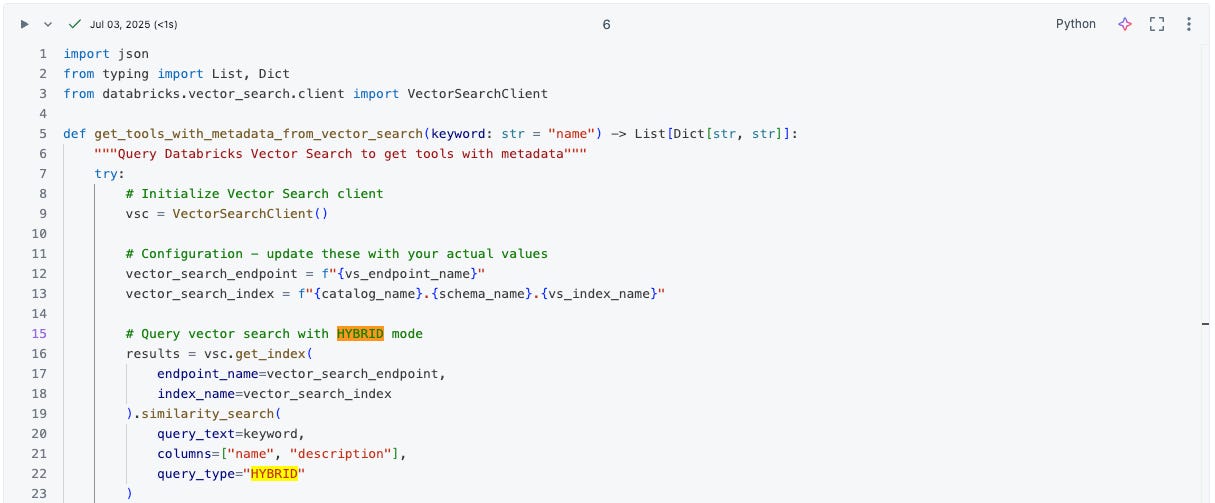
Key insight: The query_type="HYBRID" parameter is crucial here. It combines semantic vector similarity with traditional keyword matching, giving us the best of both approaches for tool discovery.
Step 2: Smart Tool Filtering and Selection
Once we retrieve tools from the vector search, we need to intelligently filter them based on relevance scores:
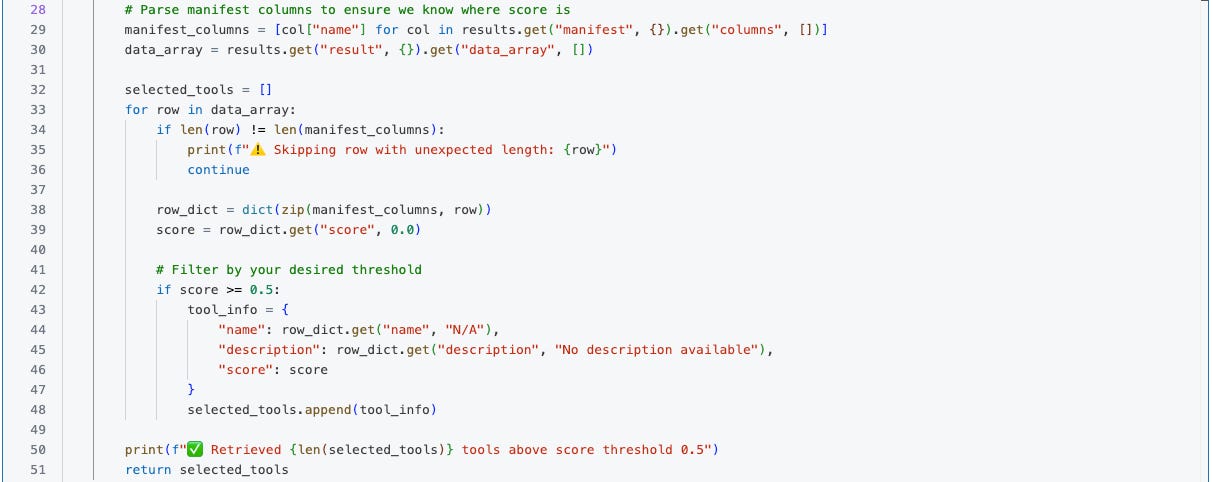
This approach ensures that only tools with high relevance scores (>= 0.5) are selected for the agent, reducing noise and improving performance.
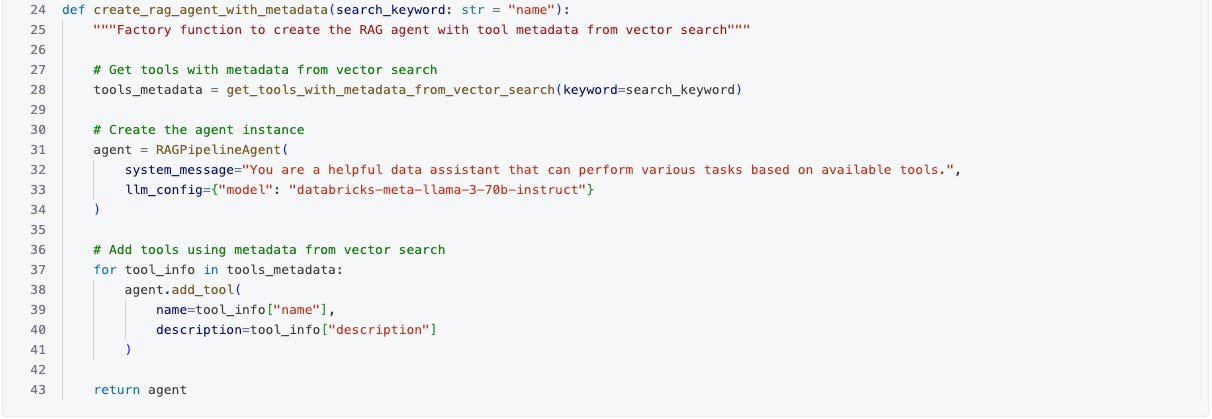
Step 3: Dynamic Agent Creation
With the relevant tools identified, we can now create a context-aware agent:
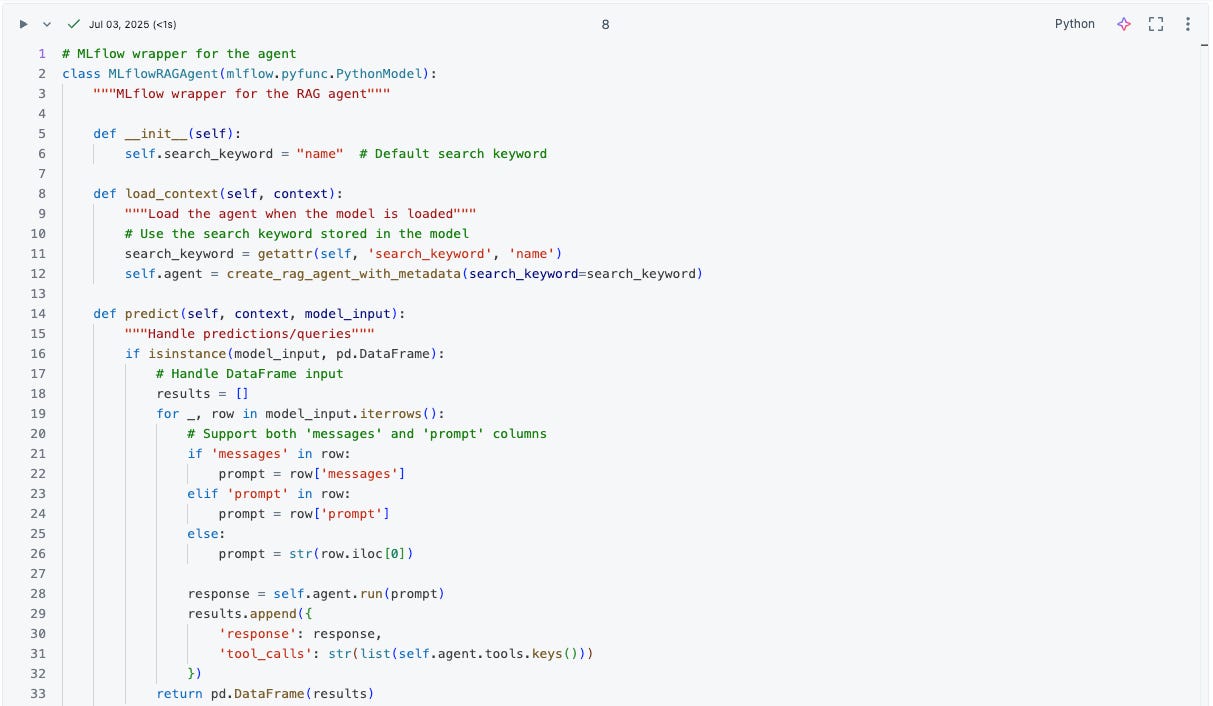
Step 4: MLflow Integration for Production Deployment
To make this production-ready, we wrap our agent in an MLflow model that can be deployed and scaled:
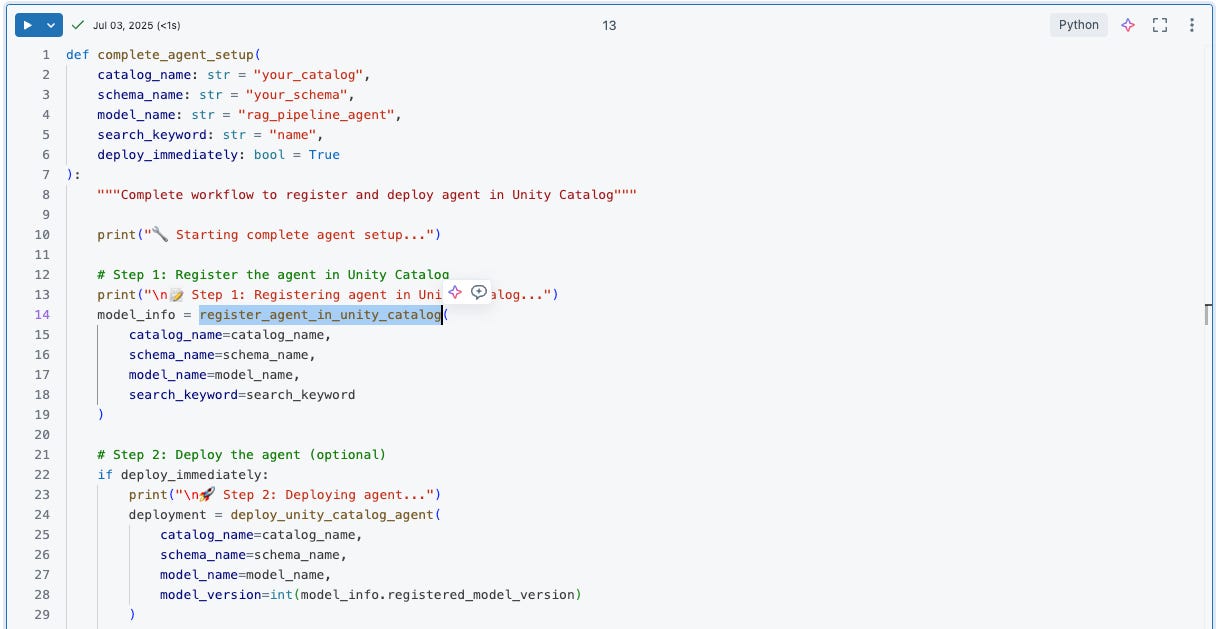
Step 5: Complete Unity Catalog Integration
The final step is registering and deploying your agent in Unity Catalog for enterprise-grade management:
Real-World Example
Let's see this in action with a practical example:
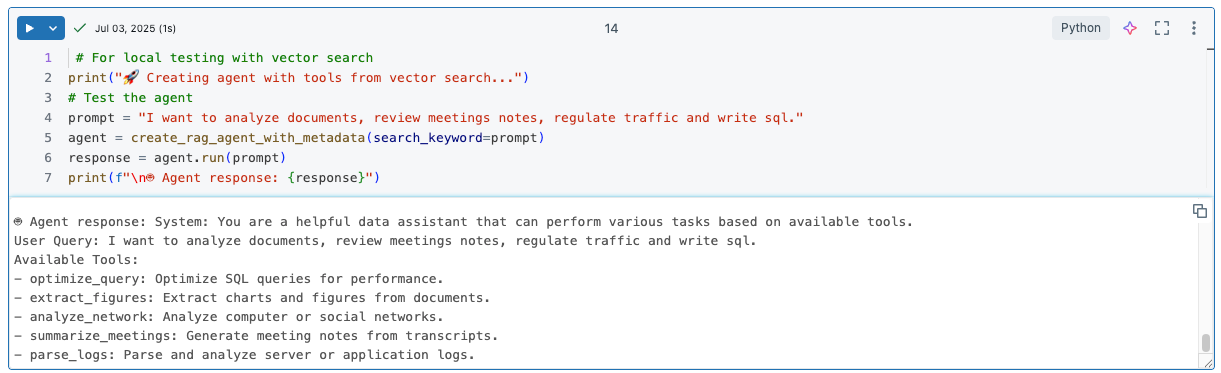
In this example, the Hybrid RAG system will:
Parse the user's intent across multiple domains (document analysis, meeting review, traffic regulation, SQL)
Search the vector index for tools related to these domains
Select the most relevant tools based on similarity scores
Create an agent with only these context-relevant tools
Execute the query with the optimal tool set
Benefits of This Approach
1. Improved Accuracy
By dynamically selecting only relevant tools, agents make better decisions and provide more accurate responses.
2. Better Performance
Smaller, focused tool sets reduce processing time and improve response latency.
3. Scalability
As your tool library grows, the system automatically handles discovery without manual configuration.
4. Cost Efficiency
Only relevant tools are loaded and processed, reducing computational costs.
5. Maintainability
New tools are automatically discoverable once added to the vector index.
Best Practices
Rich Tool Metadata: Ensure your tools have comprehensive descriptions for better semantic matching
Appropriate Thresholds: Fine-tune your relevance score thresholds based on your specific use case
Monitoring: Track tool selection patterns to optimize your vector index
Fallback Mechanisms: Always have fallback tools for when vector search fails
Regular Updates: Keep your tool descriptions current and relevant
Conclusion
Hybrid RAG for tool selection represents a significant advancement in AI agent capabilities. By combining semantic understanding with keyword-based retrieval, we can create agents that are more intelligent, efficient, and contextually aware.
This approach transforms static, rigid agents into dynamic, adaptive systems that can grow and improve over time. As your tool library expands, your agents become more powerful without requiring constant manual intervention.
The implementation in Databricks provides enterprise-grade scalability, monitoring, and deployment capabilities, making it ready for production use cases. Whether you're building customer service bots, data analysis assistants, or complex workflow automation, this Hybrid RAG approach will help you create more effective AI agents.
Ready to implement this in your own projects? Start by setting up your vector search index, defining your tool metadata schema, and experimenting with different relevance thresholds. The investment in dynamic tool selection will pay dividends as your AI agent ecosystem grows in complexity and capability.
Have you implemented similar approaches in your AI agents? Share your experiences and challenges in the comments below!